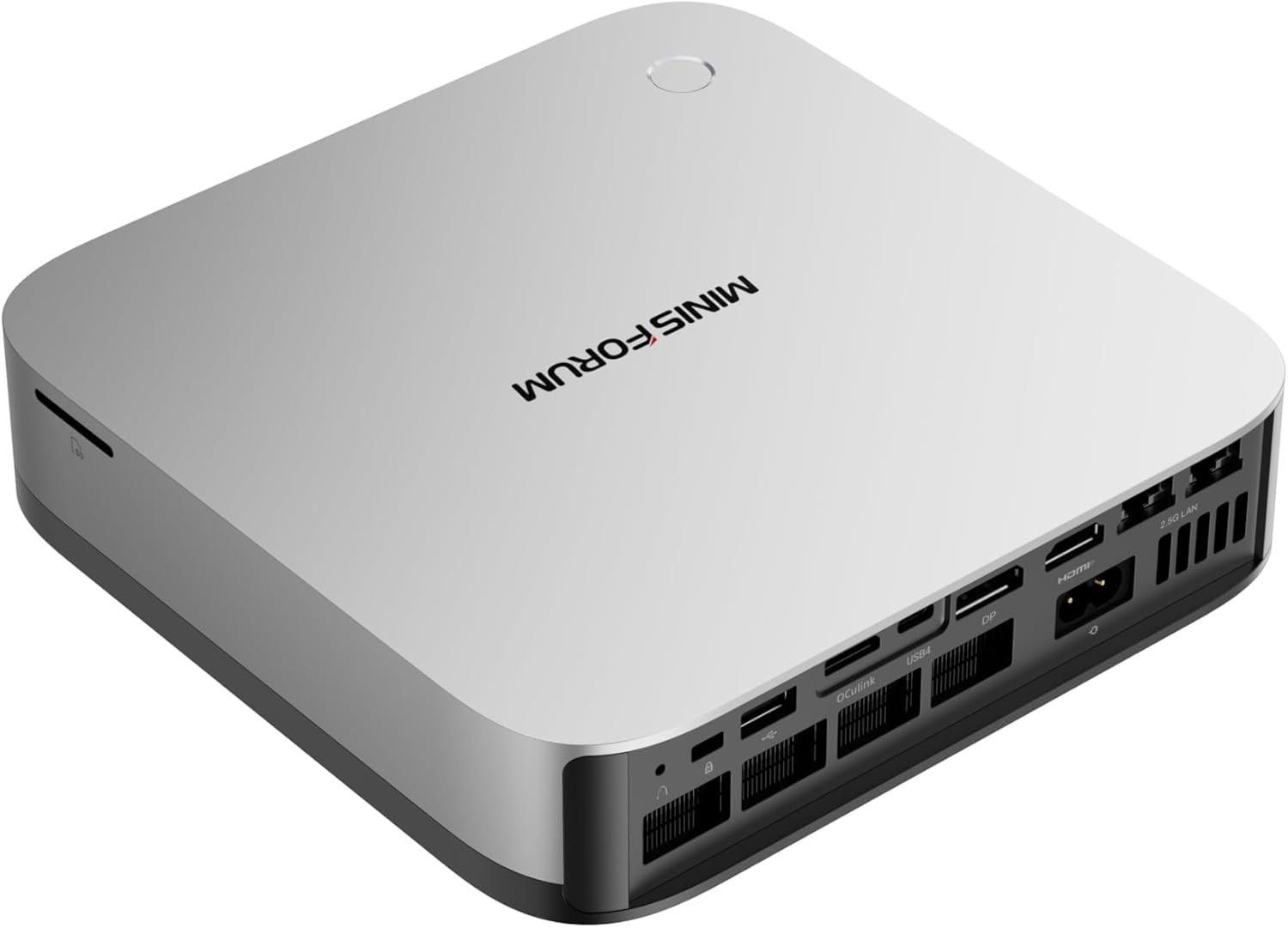
MINISFORUM continues to push the limits of compact computing with its latest high-performance offering, the M1 Pro-285H AI Mini PC. Designed for professionals, creators, and power users, this mini PC combines cutting-edge processing power, AI capabilities, and versatile expansion options in a sleek, minimalist chassis.
At its core, the device is powered by the Intel Core Ultra 9 285H, making it one of the most powerful mini PCs in its category. With support for advanced AI workloads, high-speed memory, and external GPU expansion, the M1 Pro-285H is built to handle demanding tasks without taking up much desk space.

The M1 Pro-285H is equipped with a 16-core, 16-thread processor that can reach speeds of up to 5.4GHz. This ensures excellent performance in multitasking, content creation, and even complex workloads. Paired with integrated Intel Arc graphics, the system delivers smooth visuals for multimedia editing and light gaming.
This mini PC comes with pre-installed AI capabilities, including support for Microsoft Copilot, enabling smarter workflows, automation, and enhanced productivity. Whether it’s content generation or task optimization, AI plays a key role in elevating the user experience.
Out of the box, the system includes 32GB DDR5 RAM running at 5600MHz, with support for up to 128GB and speeds up to 6400MT/s. Storage is equally impressive, thanks to dual M.2 PCIe 4.0 slots supporting up to 4TB each.
RAID 0 and RAID 1 support add flexibility—allowing users to prioritize speed or data protection depending on their needs.
One of the standout features is OCuLink support, which allows users to connect an external GPU. This significantly boosts gaming and rendering performance, making it possible to run AAA titles or heavy creative workloads beyond typical mini PC limitations.
The M1 Pro-285H supports up to four displays simultaneously via HDMI 2.1, DisplayPort 1.4, and dual USB4 ports. It can handle resolutions up to 8K at 60Hz or 4K at 144Hz, making it ideal for professionals working with multiple screens.
Connectivity is future-ready with:
This ensures seamless connectivity across modern peripherals and networks.
To handle its powerful hardware, the system uses phase-change materials, dual copper heat pipes, and a dual-fan cooling system. Even under load, temperatures remain controlled (under 86°C), while noise levels stay below 45dB, ensuring a quiet working environment.
With built-in dual stereo speakers and intelligent noise reduction, the mini PC delivers a well-rounded multimedia experience. Whether for streaming, editing, or casual gaming, it performs reliably across scenarios.
The M1 Pro-285H is priced at $999.00 in the United States and is available through Amazon and other online platforms. Considering its high-end specifications and AI capabilities, it sits in the premium mini PC segment.
Get Offer - Buy on Amazon
The M1 Pro-285H is not your average mini PC—it’s a serious workstation packed into a compact body. From the moment you start using it, the performance difference is noticeable. The Intel Core Ultra 9 processor handles everything from heavy multitasking to demanding applications with ease, making it suitable for professionals who need reliability and speed.
Where it truly stands out is its flexibility. The inclusion of OCuLink opens up possibilities that most mini PCs simply cannot offer. Users can transform this compact system into a powerful gaming or rendering machine by connecting an external GPU. This makes it highly adaptable depending on your workload.
The AI integration also adds a modern touch. With built-in Copilot support, everyday tasks feel more efficient, especially for users working with content, automation, or productivity tools.
Thermal performance is another strong area. Despite its high power output, the cooling system keeps the device stable and quiet, which is impressive given the hardware inside. This makes it suitable for office environments as well as home setups.
However, the premium price might make some users think twice, especially if they don’t plan to use its full capabilities. Also, while integrated graphics are decent, you’ll need an external GPU to unlock its full potential for gaming or heavy rendering.
Overall, the M1 Pro-285H delivers a near-desktop-level experience in a compact form, making it one of the most versatile mini PCs currently available.
If you need a compact yet extremely powerful system for professional work, AI tasks, or multitasking across multiple displays, the M1 Pro-285H is an excellent choice. It’s particularly ideal for creators, developers, and power users who want flexibility and future-proof features.
However, if your usage is limited to basic tasks or casual computing, this mini PC may be more than what you actually need.
The MINISFORUM M1 Pro-285H AI Mini PC redefines what a compact computer can do. With top-tier processing power, AI capabilities, and expandability options like OCuLink, it offers a level of versatility rarely seen in this segment.
While the price is on the higher side, the performance and features justify the investment for users who demand more from their systems. If you’re looking for a mini PC that can truly replace a traditional desktop, the M1 Pro-285H is a compelling option worth considering.
You can also check Minisforum Elite M1 Lite Review: Compact AI Mini PC with Powerful Performance.
Q1. What processor is used in the MINISFORUM M1 Pro-285H?
It features the Intel Core Ultra 9 285H processor with 16 cores and speeds up to 5.4GHz, offering top-tier performance for demanding tasks.
Q2. Does the M1 Pro-285H support external GPU?
Yes, it supports OCuLink, allowing you to connect an external GPU for enhanced gaming and heavy creative workloads.
Q3. How much RAM and storage does it support?
The mini PC comes with 32GB DDR5 RAM and supports up to 128GB. It also has dual M.2 PCIe 4.0 slots supporting up to 4TB each.
Q4. Can it run multiple displays?
Yes, it supports up to four displays with HDMI, DisplayPort, and USB4, with resolutions up to 8K or high refresh rate 4K.
Q5. Is the MINISFORUM M1 Pro-285H good for gaming?
It can handle light gaming with integrated graphics, but for AAA gaming, using an external GPU is recommended for the best experience.
To know more about our platform, visit our About Us page.


Comments