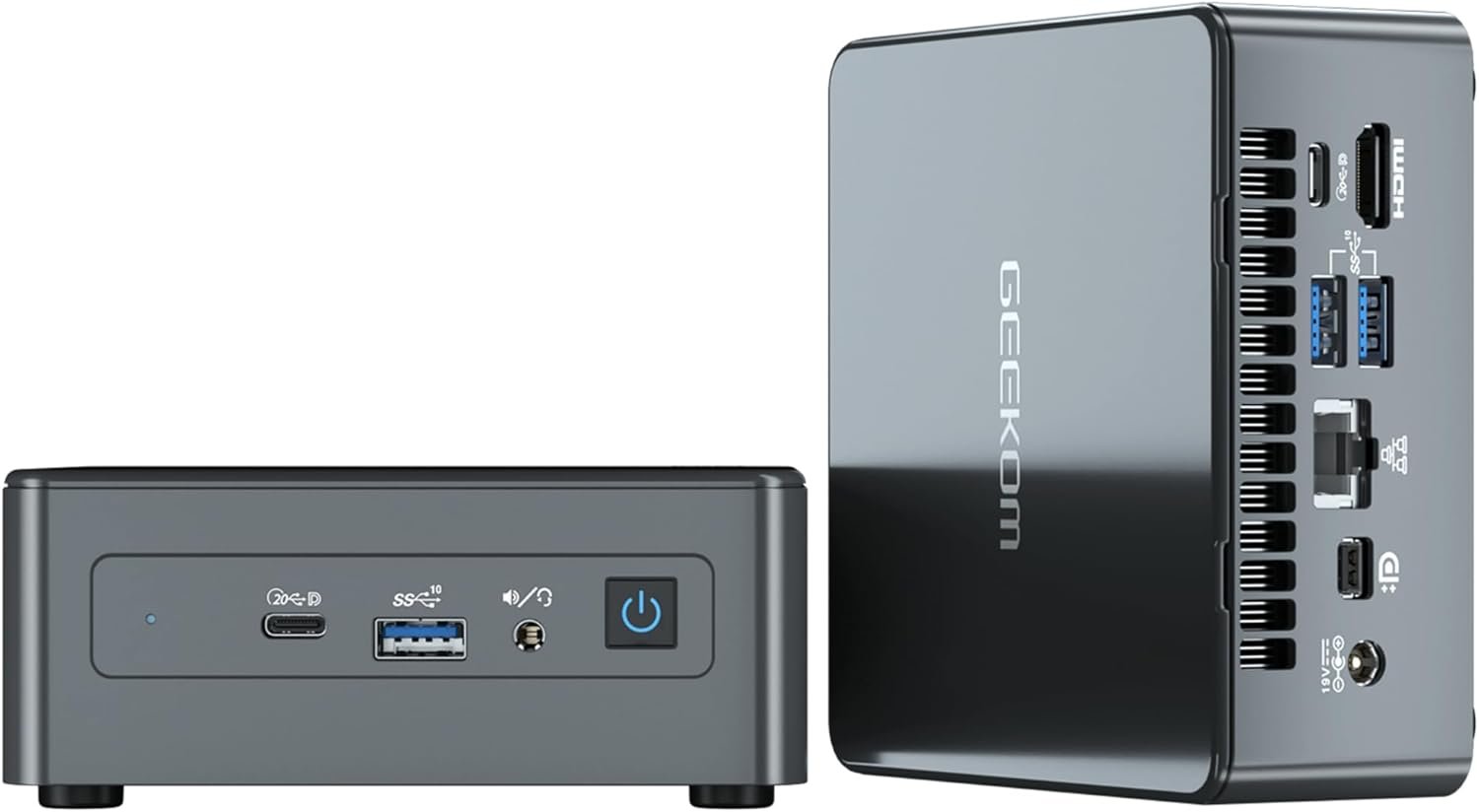
The GEEKOM IT11 Mini PC is a clear example of how far compact computing has come in recent years. Designed for users who want desktop-level performance without the bulk of a traditional tower, this mini PC packs an 11th Gen Intel Core i7 processor, generous memory, fast storage, and modern connectivity into a box small enough to mount behind a monitor. With Windows 11 Pro pre-installed and support for up to four displays, the IT11 is positioned as a serious option for home offices, business users, and anyone looking to upgrade from an aging desktop setup.
At the heart of the GEEKOM IT11 is the Intel Core i7-11390H processor, a high-performance mobile chip with 4 cores, 8 threads, and boost speeds reaching up to 5.0GHz. This processor delivers snappy performance for everyday workloads such as multitasking, office applications, web browsing, bookkeeping software, and remote desktop sessions. Despite its strong performance, the system runs at just 65 watts, making it far more energy-efficient than most traditional desktops.
The mini PC is powered by Intel Iris Xe Graphics with 96 execution units, enabling support for ultra-high-resolution displays. With two USB4 ports, one Mini DisplayPort, and one HDMI 2.0 port, the IT11 can drive up to four displays simultaneously. It supports 8K resolution at 30Hz and 4K at 60Hz, making it suitable for professionals who rely on multi-monitor setups for productivity, as well as users who want crisp visuals for media consumption.
Out of the box, the GEEKOM IT11 comes with 32GB of dual-channel DDR4 RAM running at 3200MHz, which offers noticeably better responsiveness compared to older 2666MHz memory. The system is expandable up to 64GB, making it future-proof for heavier workloads. Storage is handled by a fast 1TB M.2 PCIe NVMe SSD, with support for upgrades up to 2TB. There is also an additional 2.5-inch SATA slot, allowing users to add more storage without replacing the primary drive.
Modern wireless connectivity is another strong point of the IT11. Wi-Fi 6 provides faster speeds, lower latency, and improved stability compared to previous standards, especially in busy network environments. Bluetooth 5.2 ensures reliable connections with wireless keyboards, mice, headphones, and other peripherals, making the setup clean and cable-free.
Despite its compact footprint of just 4.6 x 4.4 x 1.8 inches, the GEEKOM IT11 offers an impressive range of ports. These include HDMI, Mini DisplayPort, two USB4 ports, three USB 3.2 Gen 2 ports, an SD card reader, a Gigabit Ethernet port, and a 3.5mm audio jack. The metal housing feels sturdy and premium, and the included VESA mount allows the mini PC to be attached behind a monitor for a completely clutter-free desk.
The GEEKOM IT11 Mini PC is currently priced at $399.00 in the US as part of a limited-time offer on Amazon. Considering the included 32GB RAM, 1TB NVMe SSD, and Windows 11 Pro license, this pricing makes it a strong value compared to similarly specced desktops and laptops.
Get Offer - Buy on Amazon
In real-world use, the GEEKOM IT11 feels impressively fast and responsive, especially for users upgrading from older, full-size desktops. Everyday tasks such as web browsing, email, office applications, and Windows operations run smoothly, with virtually no lag. The system boots quickly, applications open instantly, and multitasking remains fluid even with several programs running at once.
What stands out most is how much performance is packed into such a small box. Mounted behind a monitor, the IT11 practically disappears from view, yet it easily replaces a bulky tower that takes up significant desk or floor space. For business environments, bookkeeping, and remote access work, the mini PC performs reliably and quietly, without drawing unnecessary attention.
While this system has not been pushed heavily for gaming or graphics-intensive workloads in typical office use, the Intel Iris Xe GPU is capable enough for light creative tasks, 4K video playback, and multi-display productivity. The overall experience feels polished and dependable, making it easy to forget that you are working on a mini PC rather than a traditional desktop.
If you are looking for a compact yet powerful computer for business, home office, education, or everyday productivity, the GEEKOM IT11 Mini PC is an easy recommendation. It offers more than enough performance for most professional workloads while saving space, energy, and noise compared to traditional desktops. Users upgrading from older towers will immediately notice a significant improvement in speed and efficiency.
The GEEKOM IT11 Mini PC proves that size no longer limits performance. With a capable Intel Core i7 processor, ample memory, fast storage, and modern connectivity, it delivers a smooth and reliable computing experience in an incredibly small form factor. At its current price in the US, it represents excellent value and is a smart choice for anyone who wants desktop power without desktop bulk.
Q1: Is the GEEKOM IT11 Mini PC good for office and business use?
Yes, the GEEKOM IT11 is well-suited for office and business tasks such as bookkeeping, remote access, multitasking, email, and web-based applications thanks to its fast Core i7 processor and ample RAM.
Q2: Can the GEEKOM IT11 support multiple monitors?
The mini PC supports up to four displays at the same time, including 8K output at 30Hz and 4K at 60Hz, making it ideal for multi-monitor productivity setups.
Q3: Is the RAM and storage upgradable on the GEEKOM IT11?
Yes, the system supports up to 64GB of DDR4 RAM and allows storage expansion via an additional M.2 SSD and a 2.5-inch SATA drive.
Q4: Is the GEEKOM IT11 suitable for gaming?
The GEEKOM IT11 is not designed for high-end gaming, but it can handle light gaming, casual titles, and media playback using its Intel Iris Xe integrated graphics.
Q5: Does the GEEKOM IT11 come with Windows pre-installed?
Yes, the mini PC comes with Windows 11 Pro pre-installed and also supports Windows 10 Pro and Linux if users choose to switch operating systems.
To know more about our platform, visit our About Us page.


Comments