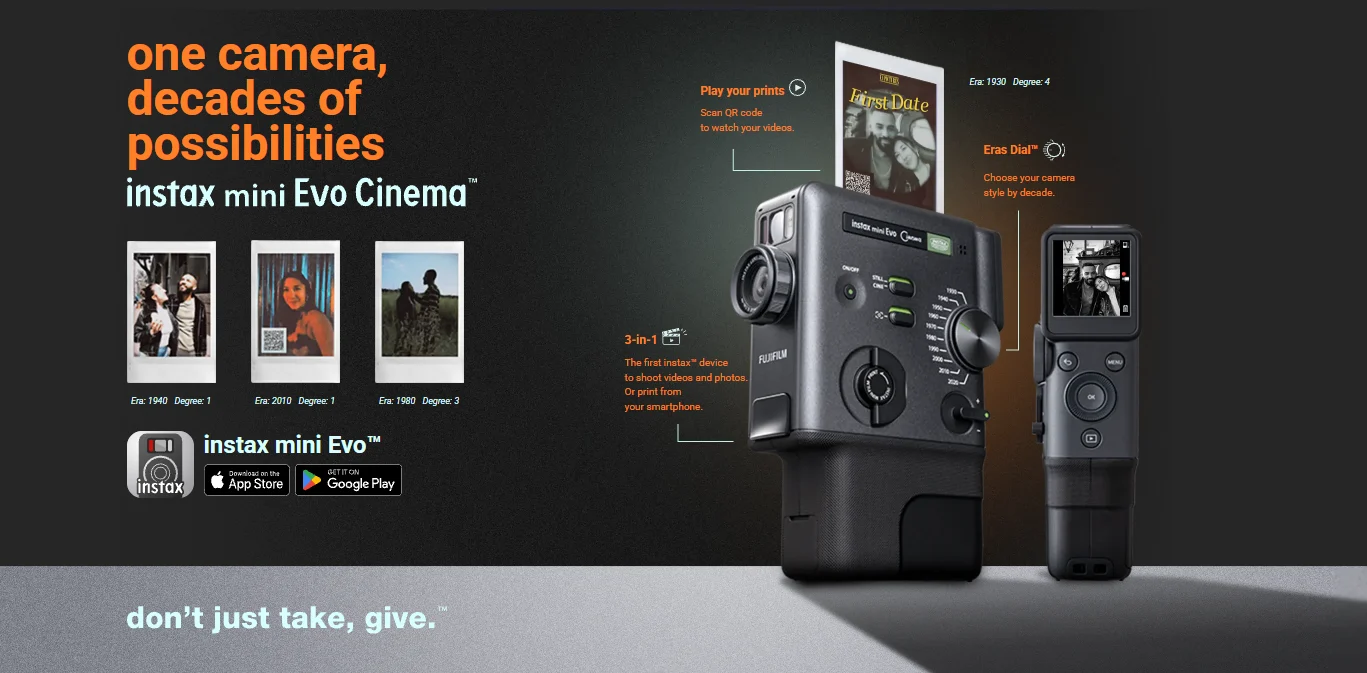
FUJIFILM India has officially launched the instax mini Evo Cinema, a new premium hybrid instant camera that adds something many instax fans have wanted for a long time—video recording. While the instax mini Evo series has already been popular for combining digital shooting with instant printing, the Cinema edition takes the concept further by turning your everyday moments into something more expressive and interactive, thanks to decade-inspired Era Effects and a new video-to-print QR feature.
This isn’t just a camera made for clicking photos and printing them on the spot. It’s designed for creators, collectors, and anyone who loves the emotional feel of instant film, but also wants modern tools like preview, transfer, templates, and share-ready formats. With this launch, FUJIFILM is clearly aiming at users who want their instant prints to feel more personal, more cinematic, and more fun than ever.
The biggest advantage of the instax mini Evo Cinema is that it doesn’t force you to print every shot. Since it’s a hybrid model, you can capture your photo digitally first, check how it looks, and only print when you’re sure. This makes the overall experience feel much smarter than traditional instant cameras, especially when film packs aren’t cheap and every frame matters.
To support this workflow, FUJIFILM has included a 1.54-inch rear LCD display which helps you preview your images before printing. Whether you’re framing a portrait, adjusting the vibe using effects, or just picking the best shot from multiple clicks, the screen makes the camera far easier to use in real-world situations like parties, travel, and casual street photography.
For still photography, the instax mini Evo Cinema captures images at 1920 × 2560 resolution using a 1/5-inch 5MP CMOS sensor. The camera is built around delivering consistent and pleasing results that look great on instax mini film, rather than chasing extreme sharpness like modern phone cameras.
FUJIFILM has also given it a strong base for reliable shooting. The camera supports an automatic ISO range of 100 to 1600, an F2.0 aperture, and shutter speeds from 1/4 to 1/8000 sec, which means it can handle different lighting conditions without making the user struggle with complicated manual settings. It uses Program AE exposure with ±2 EV compensation, along with TTL 256 split metering, helping it balance brightness more accurately when you move between indoor and outdoor scenes.
Focusing is handled through Single AF with face recognition, and the focus range goes from 10 cm to infinity, so it can comfortably shoot close-up portraits as well as wider everyday moments without feeling limited.
The most noticeable addition to this model is video support. FUJIFILM has introduced video recording in MP4 format at 24 frames per second, giving users two choices depending on the look and quality they want.
In Standard mode, the camera records video at 600 × 800, which matches the playful, instant-style character that instax is known for. For a cleaner and more detailed result, the new High-Quality 2020 mode records at 1080 × 1440, offering sharper output while still keeping the classic instax feel.
This addition makes the camera feel far more modern and expressive, because it’s no longer limited to “one printed moment.” Now it can capture a whole mini-memory—movement, expressions, atmosphere—and still give you the instant print at the end.
FUJIFILM has introduced an extremely creative idea with the instax mini Evo Cinema—video-to-print. Instead of printing only a photo, the camera can print a still frame along with a QR code on instax mini film.
Once printed, you can scan the QR code using your smartphone and instantly replay the video inside an instax-style frame. If you want, you can also download the video for sharing. This is a smart way to merge physical and digital memories because you get the charm of a printed photograph, but you also get the story behind it in video form.
For people who love collecting instant photos in albums, sticking them on walls, or gifting them to friends, this feature adds a unique twist. A printed picture becomes more than a still—it becomes an experience.
The instax mini Evo Cinema stands out not only because it can shoot video, but because it makes videos and photos feel stylistically different. FUJIFILM has introduced the Eras Dial, offering 10 effects inspired by decades from 1930 all the way to 2020.
Instead of feeling like basic filters, these effects are designed to recreate classic visual moods. For example, the camera includes a 1960s 8mm film look that brings a warm, vintage, home-movie vibe. It also includes a 1970s CRT television effect, which adds retro screen-style character that instantly feels nostalgic.
What makes this feature even more special is that the effects don’t stop at visuals. The camera adds matching audio elements while recording, including details like noise, tape flutter, and mechanical-style sounds. It’s a small touch, but it makes the final clip feel more immersive and truly inspired by older formats.
You can also adjust the intensity of each effect, which is useful because some users want subtle film character while others may prefer a bold, dramatic vintage look.
To make the camera more flexible, FUJIFILM has paired it with a dedicated smartphone app for iOS and Android, with connectivity through Bluetooth 5.4 and 2.4GHz Wi-Fi.
This app supports remote shooting, which is helpful when you want to include yourself in a frame without guessing the timing. It also allows image and video transfer, firmware updates, and instant printing of smartphone photos. Interestingly, FUJIFILM has included support for multiple formats including JPEG, PNG, and HEIF, which makes it easier for modern phone users to print images without having to convert files.
The app also adds creative tools, allowing you to merge multiple clips into a single video up to 30 seconds, apply opening and ending templates, and even create poster-style instant prints with custom text. That means the camera isn’t just about taking photos—it’s about producing small creative pieces that feel customized and personal.
The instax mini Evo Cinema is styled to look and feel premium, with a vertical grip design inspired by the FUJICA Single-8, finished in a clean black and gray color scheme. It includes physical controls that make it feel more like a real camera than a toy, including the clickable Eras Dial and a dedicated Print Lever that adds a satisfying mechanical touch to the printing process.
The camera also supports accessories like an attachable viewfinder and a grip attachment, which makes it feel more comfortable for longer use and more stable in hand—especially when shooting videos.
When it comes to printing, the camera produces prints at 1600 × 600 resolution, and it takes around 16 seconds to deliver a finished instax mini print. That’s fast enough to keep the moment exciting, especially when you’re printing memories during events or gatherings.
FUJIFILM has equipped the instax mini Evo Cinema with an internal lithium-ion battery that can produce around 100 prints per full charge. For most users, that’s enough for a full day of casual shooting and printing, whether it’s a short trip, a birthday party, or a weekend hangout.
Since instant cameras are often used in social settings, strong battery reliability matters—and this number should feel comfortable for most buyers.
The instax mini Evo Cinema Premium Edition is priced at Rs. 47,999 in India. FUJIFILM is selling it as a combo box that includes the camera along with two packs of instax mini glossy film, making it a complete ready-to-use kit for new buyers.
Pre-bookings are open in India from 21 January to 27 January 2026 through the official instax website. The camera will become available and start shipping from 28 January 2026.
As an extra benefit, FUJIFILM is also offering a pre-booking reward—customers who pre-book will receive two additional designer instax mini film packs, which makes the launch offer even more attractive for early buyers.
The instax mini Evo Cinema is clearly built for people who want instant film photography, but with a more modern and creative approach. It’s for users who enjoy capturing moments in a way that feels personal and collectible, rather than just scrolling through a phone gallery.
If you love printing memories, experimenting with vintage styles, and want a camera that turns short videos into interactive printed keepsakes, this model offers something different from typical instant cameras. At the same time, it’s priced in premium territory, so it makes the most sense for users who genuinely enjoy the instax lifestyle and plan to use it often.
With the instax mini Evo Cinema, FUJIFILM isn’t simply launching another instant camera—it’s introducing a new kind of instant storytelling. The mix of hybrid shooting, instant prints, decade-inspired effects, and the video-to-print QR feature makes it feel fresh, creative, and surprisingly meaningful.
For anyone who loves the charm of physical photographs but also wants the energy of video memories, this camera delivers a unique experience that goes beyond the usual “click and print.” It’s stylish, fun, and built for people who want their memories to feel like little pieces of cinema—printed and preserved in the most instax way possible.
Via: (Source)
To know more about our platform, visit our About Us page.


Comments