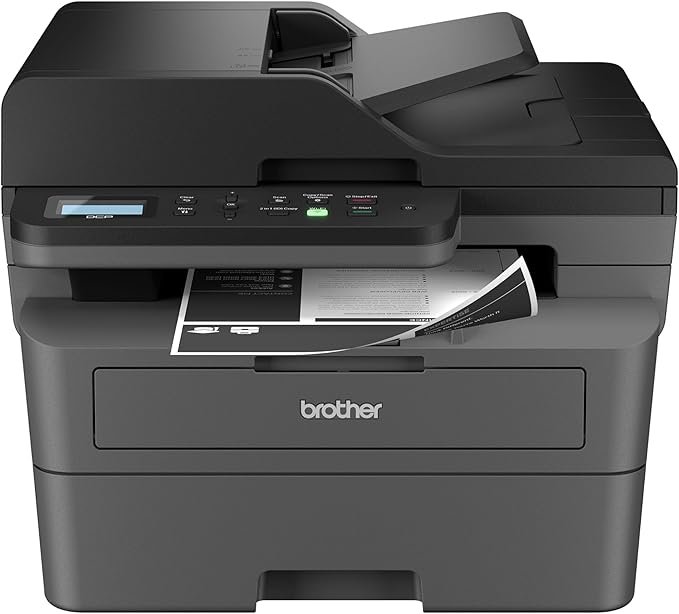
The Brother DCP-L2640DW is a compact monochrome laser printer designed to meet the demands of small businesses and home offices. Combining printing, scanning, and copying into a single device, it offers professional-quality output while helping save workspace and operational costs.
Built for productivity, this wireless multifunction printer delivers fast printing speeds, automatic duplex printing, and flexible connectivity options. Whether you need high-volume document printing or efficient scanning and copying, the DCP-L2640DW aims to simplify everyday office tasks.
The DCP-L2640DW integrates printing, scanning, and copying into one compact unit. This multifunction design helps streamline workflows while saving space, making it ideal for small offices or home-based businesses.
Speed is one of the printer’s strongest advantages. It produces black-and-white prints at speeds up to 36 pages per minute, ensuring quick turnaround for reports, invoices, and business documents. Scanning is equally efficient, with speeds up to 23.6 ipm (black) and 7.9 ipm (color). A 50-page automatic document feeder allows quick multi-page scanning and copying without manual input.
Built-in auto-duplex printing allows double-sided printing automatically, helping reduce paper consumption and creating professional-looking documents.
This printer supports dual-band Wi-Fi (2.4GHz & 5GHz), Ethernet, and USB connectivity, allowing multiple users and devices to connect securely. It adapts easily to office environments where multiple devices require reliable access.
The Brother Mobile Connect app enables users to print, scan, and manage their printer remotely from a smartphone or tablet. The app also tracks toner usage, stores scan history, and allows supply ordering, helping users stay productive even when away from their desks.
The 50-sheet auto document feeder enhances efficiency when copying or scanning multiple pages. Additional features include scan-to-email functionality, envelope printing, and network-ready capability, all designed to support everyday business workflows.
The printer uses Brother Genuine TN830 and TN830XL toner cartridges. With the Refresh EZ Print Subscription Service, users can automate toner delivery and save up to 50%, ensuring uninterrupted printing.
Despite its powerful performance, the printer maintains a compact footprint (15.7" D × 16.1" W × 12.5" H). ENERGY STAR certification supports energy efficiency, helping reduce power consumption in busy office environments.
The Brother DCP-L2640DW is priced at $209.99 in the United States. Limited-time discounts are often available on Amazon, making it a cost-effective investment for small business productivity.
Get Offer - Buy on Amazon
The Brother DCP-L2640DW stands out as a reliable workhorse for small offices and home businesses. Its fast printing speed significantly improves productivity, allowing users to handle high-volume tasks without delays. Documents print sharply and consistently, delivering professional-quality black-and-white output suitable for business use.
The automatic duplex printing feature is a major advantage, reducing paper usage while producing polished, double-sided documents. This not only saves costs but also supports environmentally conscious workflows.
Scanning and copying tasks are streamlined by the 50-page automatic document feeder. Users can process multi-page documents quickly, making it easier to digitize records or duplicate paperwork efficiently.
Connectivity flexibility is another strength. Dual-band Wi-Fi and Ethernet support allow seamless integration into multi-device environments, while the Brother Mobile Connect app enhances convenience by enabling remote printing and scan management.
Operating costs remain manageable thanks to high-yield toner options and the Refresh subscription service. These features help businesses avoid downtime and maintain predictable supply costs.
While the printer is monochrome-only, it excels in environments where black-and-white document printing dominates. Its performance, reliability, and efficiency make it a strong choice for productivity-focused users.
If your work revolves around high-volume black-and-white document printing, scanning, and copying, the Brother DCP-L2640DW is an excellent investment. Its speed, reliability, and efficient workflow features make it especially suitable for small businesses and home offices.
However, users who require color printing for graphics or photos may need a color printer instead.
The Brother DCP-L2640DW Laser Printer delivers professional-quality performance in a compact and efficient package. With fast printing speeds, automatic duplexing, strong connectivity, and reliable scanning capabilities, it meets the demands of modern small business workflows.
For users seeking a dependable monochrome multifunction printer that prioritizes productivity and cost efficiency, the Brother DCP-L2640DW stands out as a smart and practical choice.
Q1. Is the Brother DCP-L2640DW suitable for small businesses?
Yes, it is designed for small offices and home businesses, offering fast printing, scanning, and copying in one compact device.
Q2. Does this printer support wireless printing?
Yes, it supports dual-band Wi-Fi, Ethernet, and USB connectivity, allowing easy printing from multiple devices.
Q3. Can it print on both sides of the paper automatically?
Yes, it includes automatic duplex printing for double-sided documents.
Q4. Does the printer support mobile printing?
Yes, the Brother Mobile Connect app allows users to print and scan directly from their smartphones.
Q5. Is this printer capable of color printing?
No, it is a monochrome laser printer designed for high-quality black-and-white document printing.
To know more about our platform, visit our About Us page.


Comments