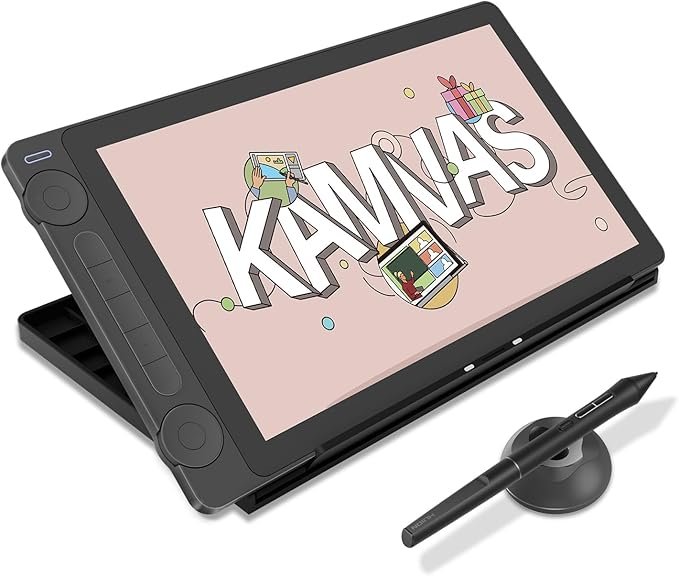
The HUION Kamvas 13 (Gen 3) is a compact yet powerful drawing tablet with a screen, designed for artists who want precision, color accuracy, and a natural drawing feel without spending a premium. Positioned as an ideal upgrade from basic pen tablets, it combines a 13.3-inch fully laminated display with HUION’s latest PenTech 4.0 technology and Canvas Glass 2.0 surface. While it is not a standalone device, its wide compatibility with PC, Mac, Android, and Linux makes it a versatile creative tool for beginners and growing professionals.
The Kamvas 13 (Gen 3) features a 13.3-inch LCD display with full lamination, which helps reduce parallax and improves cursor accuracy. The upgraded Canvas Glass 2.0 surface minimizes glare and sparkle while offering a subtle paper-like texture. This makes drawing and writing feel more natural and controlled, especially during long creative sessions.
Equipped with HUION’s PenTech 4.0 technology, the tablet supports up to 16384 levels of pressure sensitivity with a very low 2g initial activation force. This allows it to capture even the lightest strokes accurately. The PW600L pen includes three customizable side buttons, helping artists switch tools quickly and maintain a smooth workflow.
Color performance is a strong point of the Kamvas 13 (Gen 3). It delivers 16.7 million colors, covers 99% of the sRGB color space, and meets the Rec.709 standard. With an average ΔE below 1.5 and a factory calibration report included, the display ensures consistent and reliable color reproduction for illustration, design, and painting work.
To improve efficiency, the tablet includes five programmable press keys along with two dial controls. These can be customized to perform tasks such as zooming, rotating the canvas, adjusting brush size, or switching tools. Combined with the single USB-C cable connection, the Kamvas 13 (Gen 3) helps keep the workspace clean and workflow streamlined.
The included ST300 adjustable stand allows the tablet to be positioned at various angles, making it comfortable to use whether you are sketching, inking, or painting. This flexibility reduces wrist and neck strain during long drawing sessions.
The HUION Kamvas 13 (Gen 3) is compatible with Windows, macOS, Linux (Ubuntu 20.04 LTS), and Android devices that support USB 3.1 Gen 1 and DisplayPort 1.2. It also works well with most major creative software, making it suitable for a wide range of artistic workflows.
The HUION Kamvas 13 (Gen 3) is priced at $229.00 in the United States, making it one of the most affordable drawing tablets with a screen in its category.
Get Offer - Buy on Amazon
Using the HUION Kamvas 13 (Gen 3) feels intuitive and satisfying, especially for users transitioning from a basic drawing pad to a screen-based tablet. The display is bright and clear, and the Canvas Glass 2.0 surface provides just the right amount of texture to mimic the feel of paper.
The pen performance stands out immediately. Pressure sensitivity and tilt response feel natural and responsive, allowing for expressive line work and smooth shading. The customizable buttons and dual dials take some time to master, but once set up properly, they significantly speed up the creative process.
Setup is straightforward, and the tablet functions reliably as both a drawing display and a secondary monitor when needed. Accessories such as the drawing glove, adjustable stand, and extra nibs add real value, making the Kamvas 13 (Gen 3) a complete package right out of the box.
The HUION Kamvas 13 (Gen 3) is a great choice for beginners and intermediate artists who want a reliable drawing tablet with a screen at a reasonable price. It is ideal for digital illustration, animation, and painting, especially for those who prefer seeing their strokes directly on the display. If you are looking for an affordable yet capable pen display, this tablet is definitely worth considering.
The HUION Kamvas 13 (Gen 3) offers an impressive balance of performance, display quality, and affordability. With its paper-textured Canvas Glass 2.0, responsive PenTech 4.0 stylus, and thoughtful workflow features, it delivers a smooth and enjoyable drawing experience. For artists seeking a compact, feature-rich drawing tablet without a high price tag, the Kamvas 13 (Gen 3) stands out as an excellent option.
Q1: Is the HUION Kamvas 13 (Gen 3) a standalone drawing tablet?
No, it is a pen display that must be connected to a computer, laptop, or compatible Android device to function.
Q2: How good is the pen performance on the Kamvas 13 (Gen 3)?
It uses PenTech 4.0 with 16384 pressure levels, 2g activation force, and tilt support, delivering smooth and precise drawing.
Q3: Does the HUION Kamvas 13 (Gen 3) support Android devices?
Yes, it works with Android devices that support USB 3.1 Gen 1 and DisplayPort 1.2.
Q4: Is the display color-accurate enough for design work?
Yes, it offers 99% sRGB coverage with factory calibration and an average ΔE below 1.5.
Q5: Who should buy the HUION Kamvas 13 (Gen 3)?
It is ideal for beginners and intermediate artists looking for an affordable drawing tablet with a screen and reliable performance.
To know more about our platform, visit our About Us page.


Comments