
The Mini PC segment has evolved rapidly, and Gmktec is pushing the boundaries once again with the launch of the Gmktec NucBox K15 Mini PC. Designed for users who want desktop-class performance in a compact form factor, the NucBox K15 is powered by Intel’s latest Core Ultra 5 125U processor and comes loaded with modern features like USB4, OCuLink eGPU support, and up to 96GB DDR5 RAM. It targets professionals, developers, content creators, and power users who need efficiency, AI capabilities, and serious expandability without investing in a bulky desktop system.
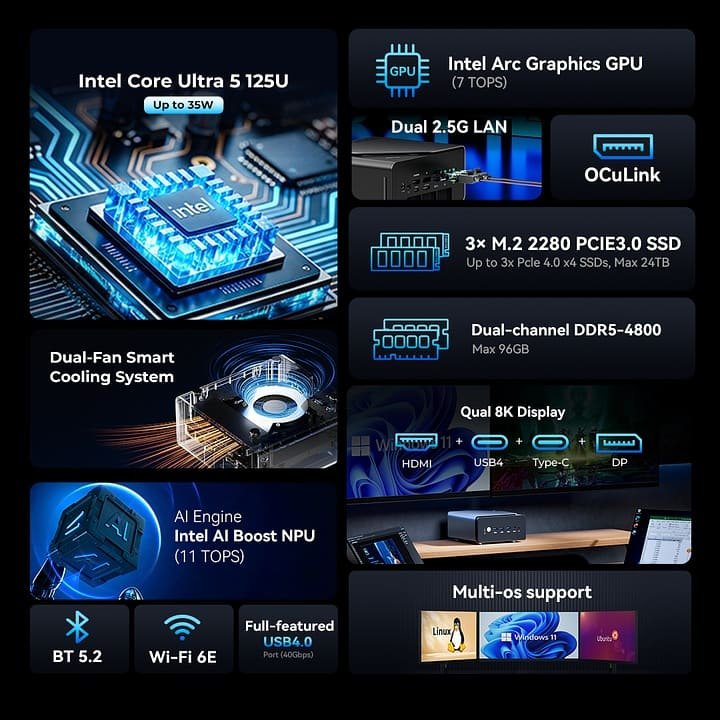
Gmktec NucBox K15 Features
At the heart of the NucBox K15 is the Intel Core Ultra 5 125U processor, featuring a 12-core, 14-thread architecture that blends performance cores, efficiency cores, and low-power cores. With turbo speeds reaching 4.3GHz and a configurable TDP of up to 35W, the system delivers a strong balance between power efficiency and sustained performance. This setup makes it well-suited for multitasking, coding, office productivity, and creative workloads.
The Mini PC comes equipped with Intel Arc integrated graphics, capable of handling light gaming, media editing, and smooth 4K to 8K video playback. What sets the K15 apart is the inclusion of Intel AI Boost NPU, delivering up to 21 TOPS of INT8 AI performance. This enables faster AI inference, local AI workloads, and improved performance in AI-accelerated applications.
One of the standout features of the Gmktec NucBox K15 is its impressive expandability. It supports up to 96GB of dual-channel DDR5-4800 RAM, which is rare in this category. Storage options are equally strong, with three M.2 2280 PCIe 4.0 SSD slots, allowing users to install up to 24TB of total storage. This makes it ideal for developers, media professionals, and users working with large datasets.
The rear-mounted OCuLink interface allows the NucBox K15 to connect to external GPUs using PCIe Gen4 x4 bandwidth. With a compatible Nvidia RTX 40 or even RTX 50-series graphics card, this Mini PC can transform into a capable gaming or rendering workstation, offering performance levels that are typically impossible in compact systems.
Connectivity is another strong area. The Mini PC features a full-function USB4 port with 40Gbps bandwidth, 100W power delivery, and DisplayPort 1.4 support. Additional ports include HDMI 2.1, DisplayPort 1.4, dual 2.5Gb Ethernet, Wi-Fi 6E, and Bluetooth 5.2. The system can drive up to four 4K displays simultaneously and even supports 8K output at 60Hz, making it ideal for multi-monitor setups.
Gmktec uses a dual-fan cooling system with copper heat pipes to manage thermals during extended workloads. The system runs at a low 15W base power draw and scales up to 35W when needed, ensuring stable performance without excessive noise or heat.
The Gmktec NucBox K15 is available through Gmktec’s official website with the following pricing options:
Get Offer - Buy on Amazon
These options allow buyers to choose between a DIY setup or a ready-to-use configuration.
In real-world usage, the Gmktec NucBox K15 delivers performance that exceeds expectations for a Mini PC. The Core Ultra 5 processor handles daily productivity tasks effortlessly, while creative workloads like photo editing, coding environments, and light video editing run smoothly. Benchmark scores ranging between 3,500 and 4,500 in 3DMark Time Spy, along with over 1.1 million points in the Master Lu benchmark, place it among the top performers in the low-power Mini PC category.
The integrated Intel Arc graphics are sufficient for casual gaming and media tasks, but the true potential of the K15 is unlocked when paired with an external GPU via OCuLink. This flexibility makes it a future-ready system that can grow with your needs. The inclusion of USB4, multi-display support, and fast networking further enhances its appeal as a compact workstation replacement.
If you are looking for a compact yet powerful Mini PC that offers excellent performance, advanced connectivity, and unmatched expandability, the Gmktec NucBox K15 is a strong contender. It is particularly well-suited for professionals, developers, AI enthusiasts, and users who want the option to upgrade to desktop-class graphics in the future.
The Gmktec NucBox K15 Mini PC stands out as one of the most versatile Mini PCs currently available. With its modern Intel Core Ultra architecture, AI capabilities, massive RAM and storage support, and unique OCuLink eGPU compatibility, it bridges the gap between traditional desktops and compact systems. For users who want long-term flexibility and high performance in a small footprint, the NucBox K15 is an investment that makes a lot of sense.
Q1: What processor does the Gmktec NucBox K15 use?
The Gmktec NucBox K15 is powered by the Intel Core Ultra 5 125U processor with a 12-core, 14-thread architecture designed for efficiency, productivity, and AI workloads.
Q2: Does the Gmktec NucBox K15 support external GPUs?
Yes, it supports external GPUs through the OCuLink interface, allowing users to connect compatible Nvidia RTX graphics cards for gaming and rendering tasks.
Q3: How much RAM and storage can the NucBox K15 support?
The Mini PC supports up to 96GB of dual-channel DDR5-4800 RAM and offers three M.2 PCIe 4.0 slots with support for up to 24TB of total storage.
Q4: Is the Gmktec NucBox K15 good for gaming?
It can handle light gaming using Intel Arc integrated graphics, but for high-end gaming, pairing it with an external GPU via OCuLink delivers much better performance.
Q5: Which operating systems are supported on the NucBox K15?
The system ships with Windows 11 pre-installed and also supports popular Linux distributions such as Ubuntu.


Comments