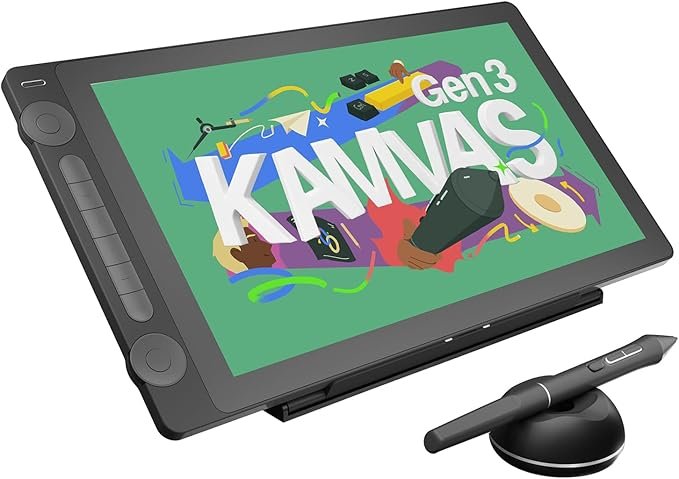
The HUION KAMVAS 16 (Gen 3) is a premium pen display designed for artists, designers, and animators who want a large, color-accurate drawing screen without stepping into ultra-expensive professional territory. Featuring a sharp 2.5K QHD resolution, HUION’s latest PenTech 4.0 technology, and a refined anti-glare canvas glass, this tablet is built to deliver a natural, precise, and immersive drawing experience. While it is not a standalone device, its strong compatibility with PCs, Macs, Android devices, and Linux makes it a versatile tool for both beginners and professionals.
The KAMVAS 16 (Gen 3) features a 15.8-inch display paired with a 2.5K QHD resolution of 2560 × 1440. This combination results in a pixel density of 186 PPI, delivering crisp visuals, fine line detail, and sharp text. The screen size provides ample workspace for illustration, animation, and design tasks without feeling overwhelming on a desk.
Color accuracy is one of the strongest aspects of this tablet. It covers 99% of the sRGB and Rec.709 color gamuts, along with 90% of Adobe RGB. With a △E value below 1.5, colors appear true-to-life and consistent, making the KAMVAS 16 (Gen 3) suitable for professional-level work such as illustration, photo editing, and visual design.
HUION’s PenTech 4.0 brings a noticeable improvement in pen performance. The included PW600L pen uses the HV200 chip to enhance pressure sensitivity and cursor tracking. With 16384 levels of pressure sensitivity and just 2g of initial activation force, even the lightest strokes are captured accurately. The pen also supports ±60° tilt, allowing for natural shading and brush effects similar to traditional drawing tools.
The upgraded Canvas Glass 2.0 uses nano-etching technology to reduce glare and sparkle while providing a subtle paper-like texture. This surface improves control during drawing and reduces eye strain during long sessions. Full lamination minimizes parallax, ensuring the cursor stays closely aligned with the pen tip for precise input.
The KAMVAS 16 (Gen 3) includes two physical dial controllers and six silent press keys. These can be customized for different functions depending on the software you use. The slightly raised 2mm dial design allows for more precise control when adjusting brush size, zooming, rotating the canvas, or scrubbing timelines in animation software.
This tablet supports both a full-featured USB-C connection and a 3-in-1 HDMI cable setup. Connection stability has been improved to reduce random disconnections, and the included USB-C cable helps keep your workspace clean and clutter-free. It also supports Android devices that meet USB 3.1 Gen 1 and DP 1.2 requirements, expanding its usability beyond computers.
The HUION KAMVAS 16 (Gen 3) works with Windows 10 or later, macOS 10.12 or later, Linux (Ubuntu 20.04 LTS), and compatible Android devices. It supports most major creative software, including Clip Studio Paint, Photoshop, and other industry-standard applications.
The HUION KAMVAS 16 (Gen 3) is priced at $459.00 in the United States. A limited-time offer is currently available on Amazon US, making it a competitive option in the mid-to-high-end pen display market.
Get Offer - Buy on Amazon
Using the HUION KAMVAS 16 (Gen 3) feels refined and professional from the moment it is set up. The display immediately stands out with its brightness, clarity, and accurate colors. The 2.5K resolution looks exceptionally sharp, often rivaling or even outperforming standard desktop monitors in terms of detail and vibrancy.
Drawing on the Canvas Glass 2.0 surface feels smooth and controlled, with just enough resistance to mimic paper. The PW600L pen performs exceptionally well, responding accurately to pressure and tilt with minimal lag or wobble. The smaller pen nib improves visibility, making precise line work easier, especially for detailed illustrations.
The dual dials quickly become a favorite feature during extended work sessions. They make zooming, rotating, and adjusting brush settings intuitive and efficient, reducing reliance on keyboard shortcuts. Compatibility with Clip Studio Paint and other popular software is seamless, and setup is straightforward.
Overall, the tablet feels complete right out of the box. With the included stand, glove, cables, extra nibs, and cleaning accessories, everything needed to start drawing is already provided.
The HUION KAMVAS 16 (Gen 3) is an excellent choice for artists who want a high-quality pen display without paying flagship prices. It is suitable for beginners looking to upgrade from basic tablets and professionals who need accurate colors and precise pen performance. If you work primarily at a desk and want a reliable, feature-rich drawing monitor, this tablet is a strong investment.
The HUION KAMVAS 16 (Gen 3) delivers a premium drawing experience with its sharp 2.5K display, outstanding color accuracy, and refined PenTech 4.0 stylus performance. Combined with a thoughtful design, dual dial controls, and a generous accessory package, it offers excellent value for its price. Whether you are a beginner or a seasoned professional, this tablet provides the tools and performance needed to create with confidence.
Q1: Is the HUION KAMVAS 16 (Gen 3) a standalone tablet?
No, it is a pen display that must be connected to a computer, laptop, or compatible Android device to work.
Q2: What makes PenTech 4.0 special on the KAMVAS 16 (Gen 3)?
PenTech 4.0 offers 16384 pressure levels, ultra-low 2g activation force, improved cursor tracking, and better tilt accuracy for natural drawing.
Q3: Does the HUION KAMVAS 16 (Gen 3) work with Android devices?
Yes, it supports Android devices that have USB 3.1 Gen 1 and DisplayPort 1.2 compatibility.
Q4: Is the display color-accurate enough for professional work?
Yes, it covers 99% sRGB and Rec.709 with a △E below 1.5, making it suitable for professional illustration and design.
Q5: What software works best with the HUION KAMVAS 16 (Gen 3)?
It works well with popular creative software such as Clip Studio Paint, Photoshop, Illustrator, and many animation and 3D tools.
To know more about our platform, visit our About Us page.


Comments