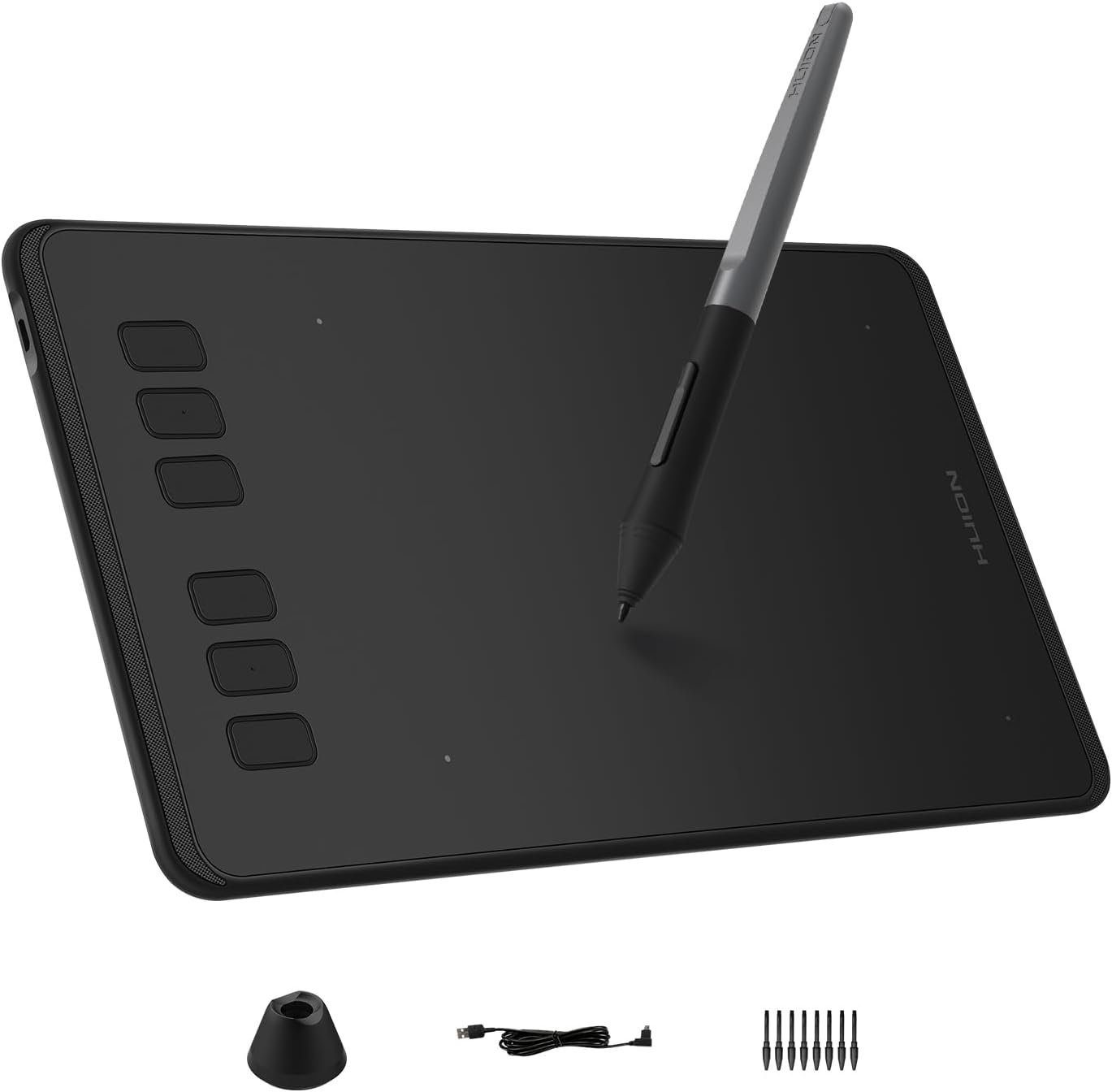
The HUION Inspiroy H640P Drawing Tablet is designed for users who want a reliable and affordable entry into digital creativity without compromising core performance. With a compact 6x4-inch active area, a battery-free stylus, and wide compatibility across operating systems, this tablet targets beginners, students, educators, and even professionals looking for a portable secondary device. Its minimalist design, responsive pen input, and customizable workflow make it a practical tool for drawing, writing, teaching, and everyday productivity.
The HUION Inspiroy H640P comes with a 6x4-inch active drawing area that strikes a balance between usability and portability. Its slim profile of just 0.3 inches and lightweight build of around 1.41 lbs make it easy to slip into a laptop bag and carry between home, office, or classroom. This compact size is especially useful for users with limited desk space or those who frequently work on the go.
The tablet includes the PW100 battery-free stylus, eliminating the need for charging or replacing batteries. With 8192 levels of pressure sensitivity, the pen responds accurately to light and heavy strokes, allowing for smooth line variation and better control. The stylus feels similar to a standard pen, which helps reduce the learning curve, and the side buttons make switching between pen and eraser quick and intuitive.
The H640P features six easily accessible press keys that can be customized through the Huion driver. These shortcut keys can be mapped to commonly used functions like undo, redo, zoom, brush size adjustment, or app-specific commands. Users can even set different shortcuts for different software, making the workflow more efficient across drawing, design, or teaching applications.
One of the strongest points of the HUION Inspiroy H640P is its multi-OS compatibility. It works seamlessly with Windows, macOS, Linux (Ubuntu), and select Android smartphones or tablets running Android 6.0 or later. Left-handed users are also supported through driver settings. However, it is important to note that the tablet does not support iOS devices.
This tablet is not limited to digital art. It functions effectively as a writing pad, signature pad, or even a mouse alternative. Users can sign documents, take handwritten notes, annotate files, or navigate their system with more precision than a traditional mouse. This makes it useful for online teaching, remote work, and general productivity tasks.
The HUION Inspiroy H640P works well with popular creative software such as Photoshop, SAI, Medibang Paint, and many other design tools. It is also compatible with applications used for online education and collaboration, including OneNote, Microsoft Whiteboard, Zoom, and similar platforms, making it suitable for students and teachers alike.
The HUION Inspiroy H640P Drawing Tablet is currently priced at $27.99 in the United States. A limited-time offer is available on Amazon US, making it one of the most affordable graphics tablets in its category with this level of features.
Get Offer - Buy on Amazon
Using the HUION Inspiroy H640P feels surprisingly refined for a tablet in this price range. The setup process is straightforward, and the tablet is ready to use within minutes. The build quality feels solid, and despite its lightweight design, it holds up well during daily use. Many users have reported using it consistently for months without any noticeable drop in performance.
The stylus responsiveness is a standout aspect. Drawing, sketching, and writing feel smooth, and pressure sensitivity works reliably across different applications. While it takes some time to adjust to drawing on a tablet while looking at a screen instead of directly on the surface, the experience becomes natural with regular use.
The shortcut keys add practical value, especially for creative workflows. Small design touches, such as raised bumps on two of the buttons, help users identify keys by touch, which is useful during focused work. One helpful detail to note is the physical switch on the side that enables or disables the shortcut buttons. If the buttons stop working unexpectedly, checking this switch can quickly solve the issue.
Overall, the tablet performs consistently across drawing programs and productivity tasks, making it a dependable tool for both creative and professional use.
The HUION Inspiroy H640P is a strong choice for beginners, students, and budget-conscious users who want a reliable drawing tablet without spending a lot. It is also suitable for professionals looking for a portable secondary tablet for note-taking, quick sketches, or remote work. While it may not replace larger or screen-based tablets for advanced illustration work, it delivers excellent value for its price.
The HUION Inspiroy H640P Drawing Tablet proves that you do not need to spend a premium to get a smooth and functional digital drawing experience. With a responsive battery-free stylus, customizable keys, broad software support, and a compact design, it stands out as one of the best entry-level graphics tablets available today. For under $30, it offers impressive performance, durability, and versatility, making it an easy recommendation for anyone starting their digital creative journey or needing a dependable everyday tablet.
Q1: Is the HUION Inspiroy H640P good for beginners?
Yes, it is an excellent choice for beginners due to its affordable price, easy setup, and natural pen experience with high pressure sensitivity.
Q2: Does the HUION Inspiroy H640P work with Android phones?
Yes, it supports select Android smartphones and tablets running Android 6.0 or later, making it suitable for on-the-go creativity.
Q3: Does the HUION Inspiroy H640P support iPhone or iPad?
No, this drawing tablet does not support iOS devices, including iPhones and iPads.
Q4: Can the HUION Inspiroy H640P replace a mouse?
Yes, it works well as a mouse alternative for tasks like navigation, note-taking, document signing, and precise cursor control.
Q5: Which software is compatible with the HUION Inspiroy H640P?
It is compatible with popular creative software such as Photoshop, SAI, Medibang Paint, and productivity tools like OneNote, Microsoft Whiteboard, and Zoom.
To know more about our platform, visit our About Us page.


Comments