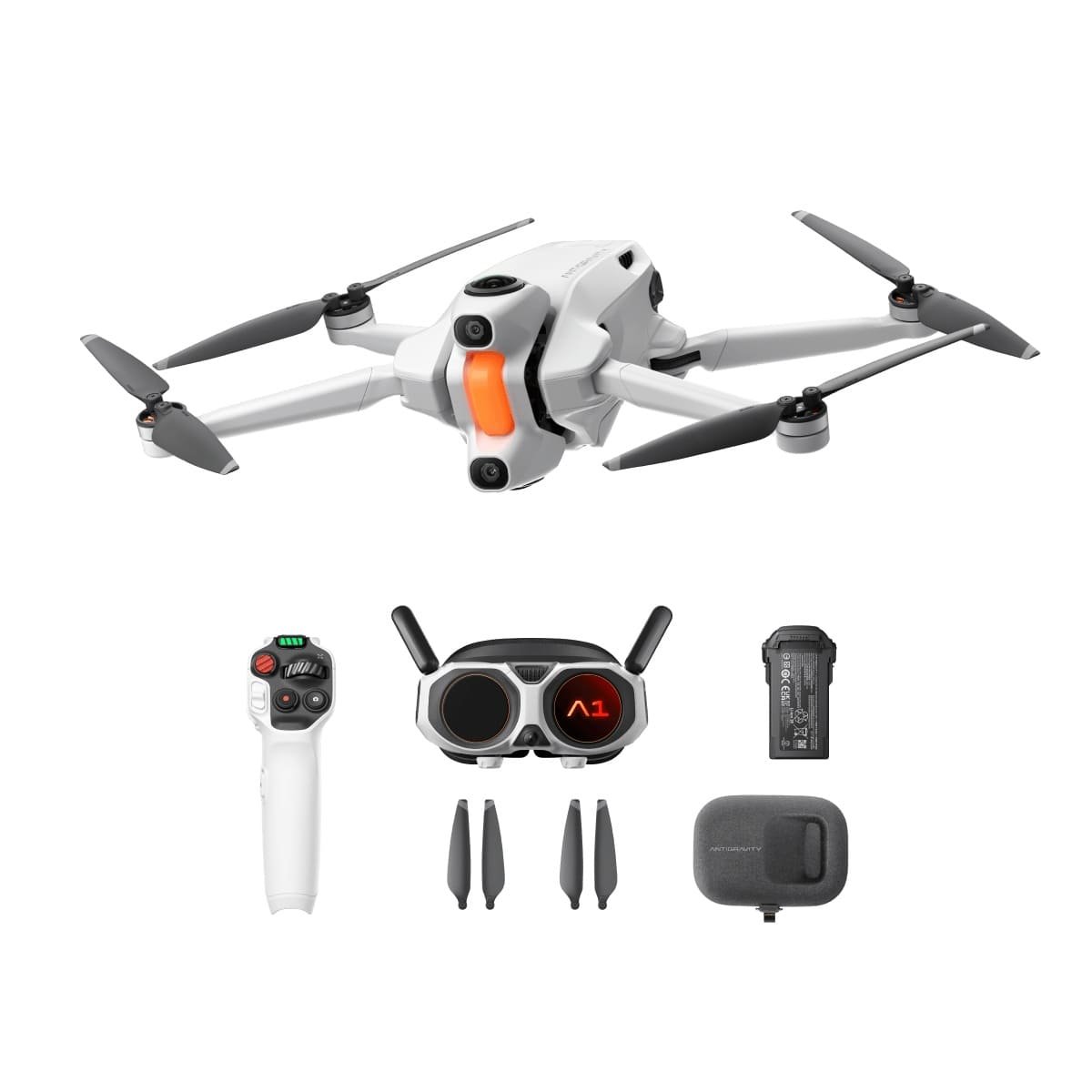
The Antigravity A1 enters the drone market as a completely different kind of aerial camera system—one that doesn’t just record a flight path but captures the entire world around it in full 360 degrees. Instead of the traditional “point the gimbal forward and hope you got the shot,” the A1 allows creators to focus on flying and worry about framing later. With a dual-lens 8K 360° system, advanced digital stabilization, AI-enhanced shooting modes, and a lightweight sub-250g body, it’s engineered for filmmakers, travelers, and FPV enthusiasts who want maximum creative control with minimum constraints. The invisible drone effect, reframing freedom, and ultra-immersive flight experience place the A1 in a category of its own.
The A1’s biggest breakthrough lies in its two-lens configuration—one lens on top and another on the bottom—working together to capture a perfect 360-degree sphere. Powered by dual 1/1.28-inch CMOS sensors and a fixed f/2.2 aperture, the drone collects impressive light for its weight class. What makes it special is its ability to remove its own body and propellers from the footage using advanced stitching co-developed with Insta360. The result is a clean aerial perspective where the drone seemingly disappears.
Recording up to 8K at 30fps, the A1 delivers exceptional detail for reframing and large-format editing. Creators who want smoother motion can switch to 5.2K at 60fps, while 4K at 100fps accommodates slow-motion shots. With a maximum bitrate of 170 Mbps and support for both H.264 and H.265, the footage retains a high amount of detail for professional post-production. The ISO range of 100–6400 also gives room to adapt to different lighting environments.
For still creators, the A1 shoots 55MP 360-degree photos in DNG RAW or INSP formats. This opens possibilities for immersive virtual tours, aerial photography, and creative composites. Standard 14MP shots are also available when a smaller file size is preferred. HDR, Burst, and AEB modes give photographers the flexibility they expect in a premium drone.
One of the biggest advantages of capturing the entire sphere is that decisions about camera angles can happen after the flight. Using Antigravity Studio or the mobile app, users can pan, tilt, zoom, rotate, or apply “Tiny Planet” effects and dramatic perspective shifts—all from one single recording. Multi-aspect export makes sharing simple, whether the goal is a cinematic 16:9 YouTube video or a vertical 9:16 clip for Reels or TikTok.
Instead of relying on a mechanical gimbal, the A1 uses a gimbal-free stabilization system derived from Insta360’s FlowState technology. It digitally locks horizons, smoothens turbulence, and removes micro-vibrations, creating gimbal-like smoothness without added weight or mechanical failure risks. This also keeps the drone under 250 grams, ideal for travel and for regions with lighter drone regulations.
The A1 comes with Deep Track, an intelligent tracking system that identifies and follows subjects automatically during editing. It mimics professional tracking shots by centering the subject even if flight paths are imperfect. Sky Genie adds one-tap cinematic flight patterns—Orbit, Spiral, Arc Shot, and more—letting any level of pilot capture dynamic footage instantly.
The Antigravity A1 starts at $1,599 in the United States. The price is higher than most drones in its weight category, but the 360-degree workflow, ultra-immersive goggles experience, and advanced imaging capabilities place it firmly in the premium creative tool segment.
Get Offer - Buy on Amazon
The Antigravity A1 feels less like a traditional drone and more like a flying 360° camera rig that expands what’s creatively possible. The immersive view through its Vision Goggles offers a cockpit-like experience that makes flying both intuitive and thrilling. Being able to look around simply by moving your head adds a natural fluidity that’s rare in drones. Paired with the motion-based Grip controller, the learning curve is surprisingly manageable for new pilots.
The footage quality stands out because of the flexibility. While it’s true that reframed clips don’t match the sharpness of dedicated directional cameras, the power of reframing, rotating, zooming, and keyframing after the flight is transformative. What used to require multiple takes, precise gimbal movements, and choreographed flight paths now happens with one simple recording pass.
The invisible drone effect is genuinely impressive. Having a completely unobstructed spherical view changes how creators envision aerial storytelling. Features such as FlowState stabilization further enhance the output, offering buttery smooth footage even in breezy conditions. Photographers will appreciate the detailed 55MP stills, and filmmakers will enjoy the range of shooting modes and high bitrate support.
The downsides mostly relate to workflow complexity and cost. Editing 360° footage is more time-intensive, and the reliance on goggles means you may need a visual observer depending on local regulations. Some users have noted early software bugs, but updates continue to improve performance.
Overall, the A1 pushes the boundaries of what a sub-250g drone can deliver, providing a blend of creativity and immersion unmatched in its class.
The Antigravity A1 is ideal for creators who want something fundamentally different from the typical forward-facing camera drone. If your style leans toward dynamic edits, immersive shots, reframing flexibility, and experimental storytelling, the A1 will feel like a creative powerhouse. However, if your goal is pure per-angle sharpness or you prefer a straightforward fly-and-shoot workflow, a traditional gimbal drone might make more sense.
The Antigravity A1 stands out as one of the most innovative drones released in recent years. Its 8K 360° capture system, invisible-drone effect, and deep reframing options unlock creative possibilities that simply don’t exist with standard drones. While the price and workflow complexity may deter beginners, those who embrace its full potential will find it an extraordinary tool for cinematic aerial content. For filmmakers and creators ready to explore a new dimension of drone videography, the A1 delivers a truly next-generation experience.
Q1: What makes the Antigravity A1 different from regular drones?
The A1 captures full 360° 8K footage, allowing you to reframe camera angles later and remove the drone body from the final video.
Q2: Does the Antigravity A1 need a gimbal?
No, it uses FlowState digital stabilization, delivering smooth, gimbal-like footage without mechanical parts.
Q3: Can beginners fly the A1 easily?
Yes, the motion-based Grip controller and immersive goggles make it simpler for newcomers to learn compared to traditional dual-stick remotes.
Q4: What is the maximum photo resolution?
The A1 captures 55MP 360-degree still photos in both RAW and standard formats.
Q5: Is the Antigravity A1 good for professional creators?
Absolutely. Its 8K 360° capture, reframing flexibility, AI tracking, and cinematic modes make it a strong tool for filmmakers and content creators.
Image Credits: Antigravity A1


Comments